
Fine-Tuning Large Language Models with NeMo-RL and GRPO on Google Kubernetes Engine (GKE)
1. Overview
This repository provides a comprehensive guide and toolkit for fine-tuning state-of-the-art large language models (LLMs) using Reinforcement Learning (RL). The solution leverages NVIDIA’s NeMo-RL framework, running on a distributed Ray cluster deployed on Google Kubernetes Engine (GKE).
The primary goal is to enhance model performance on specific tasks by applying the GRPO (Generative Rejection Policy Optimization) algorithm. This process has been tested with several leading models, including:
This example is validated on datasets OpenMathInstruct, Deepscaler, and GSM8K.
The architecture is designed for scalability and efficiency, utilizing a high-performance parallel filesystem and dedicated GPU resources for different components of the RL pipeline.
2. Architecture
The training infrastructure is built on a Ray cluster deployed on GKE, featuring a head node and multiple worker nodes. This setup allows for both collocated and non-collocated worker configurations. The diagram below illustrates a non-collocated setup where different workers run on separate nodes to optimize resource utilization.
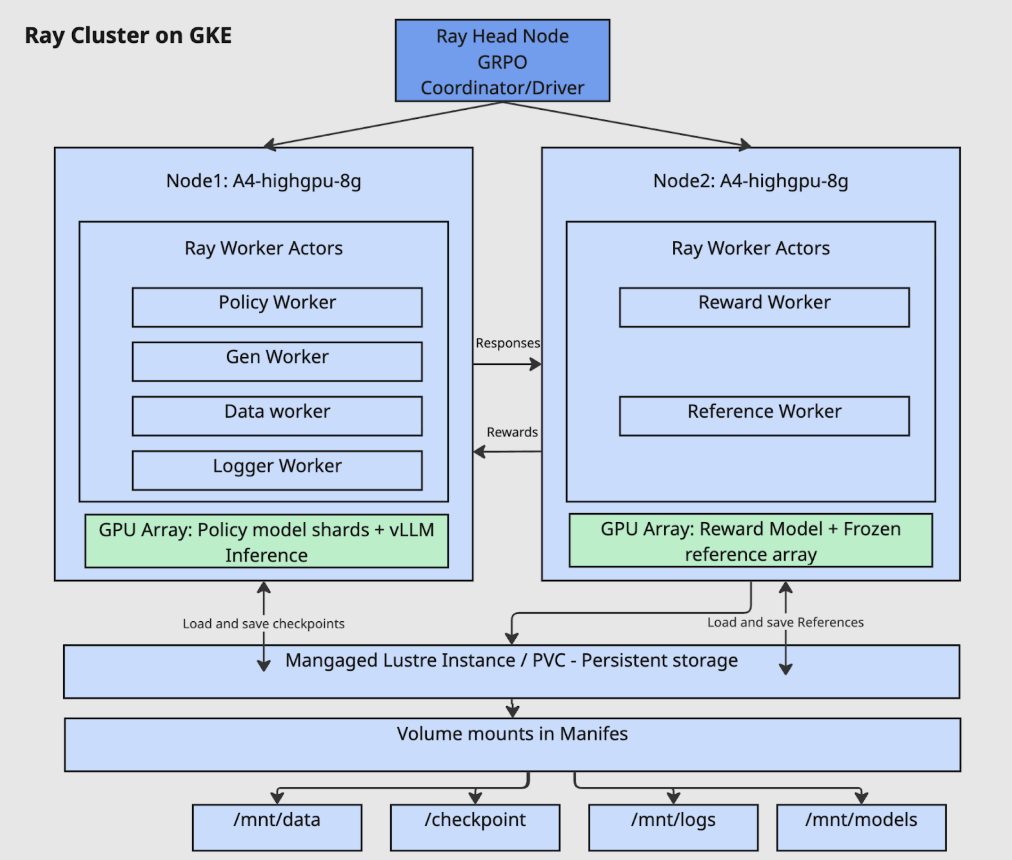
Key Components:
-
Ray Head Node:
- Acts as the central coordinator for the Ray cluster.
- Runs the main driver process, which orchestrates the GRPO algorithm.
-
Ray Worker Nodes (e.g.,
A4-highgpu-8g):- Node 1 (Policy & Generation):
- Policy Worker: Updates the model’s policy based on feedback.
- Gen Worker: Generates responses using the current policy.
- Data Worker: Manages the data flow for training.
- Logger Worker: Handles logging and metrics.
- GPU Array: Utilizes vLLM for high-throughput inference with the sharded policy model.
- Node 2 (Reward & Reference):
- Reward Worker: Evaluates the generated responses and calculates a reward score.
- Reference Worker: Holds the frozen reference model to provide a baseline for comparison.
- GPU Array: Dedicated to running the reward and reference models.
- Node 1 (Policy & Generation):
-
Persistent Storage:
- A Managed Lustre instance (or other high-performance Persistent Volume Claim) is used for shared storage across all nodes.
- This ensures that models, checkpoints, data, and logs are persisted and accessible throughout the training lifecycle via volume mounts (
/mnt/data,/mnt/checkpoints,/mnt/logs,/mnt/models).
3. Workflow Pipeline
The end-to-end process for fine-tuning and deploying a model follows a structured pipeline, ensuring reproducibility and iterative improvement.
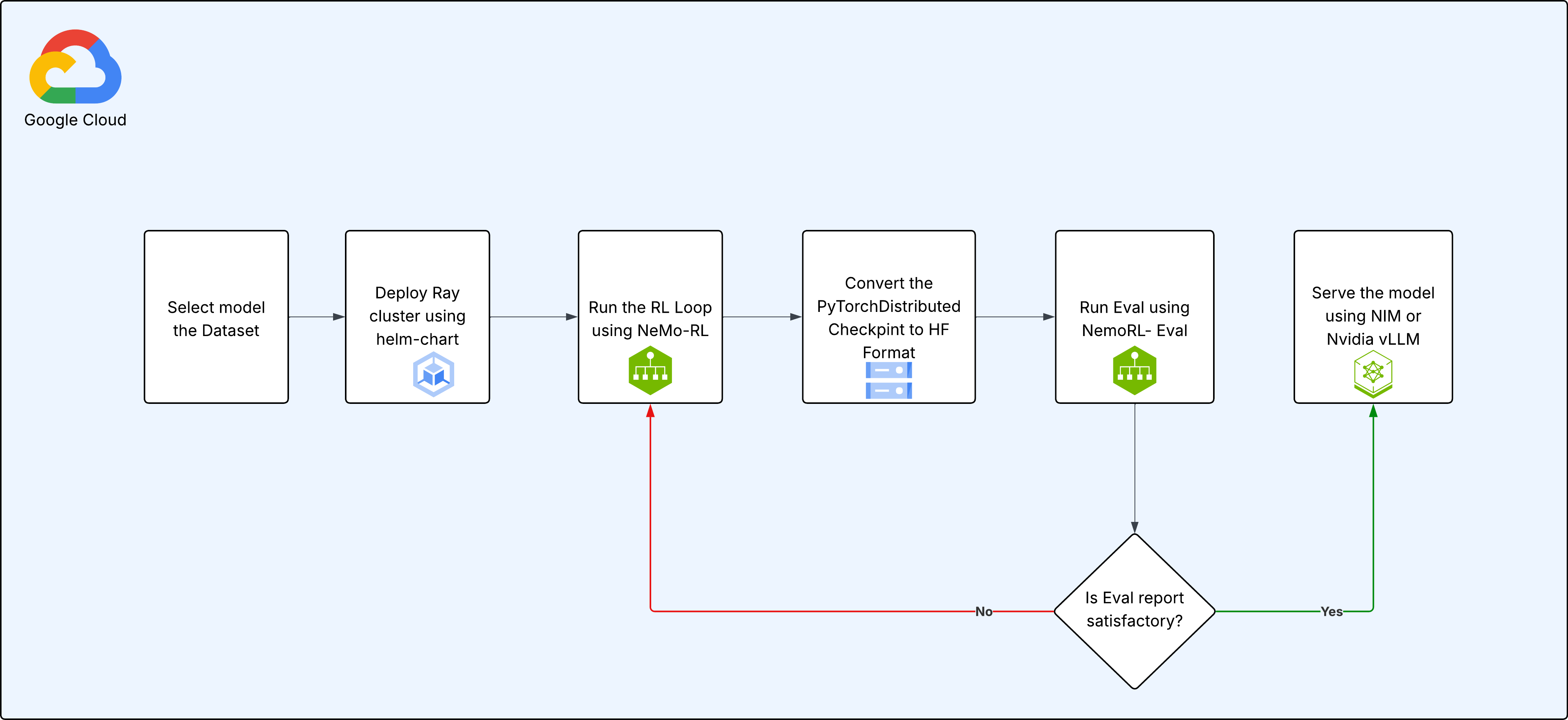
Step-by-Step Process:
-
Select Model and Dataset: Begin by choosing the base pre-trained model (Llama, Gemma, or Qwen) and the dataset you want to use for fine-tuning.
-
Deploy Ray Cluster: Use the provided Helm chart to deploy a Ray cluster onto your GKE environment. This automates the setup of the head and worker nodes.
-
Run RL Training Loop: Execute the main training script, which uses NeMo-RL to start the GRPO training loop. During this phase:
- The policy model generates responses.
- The reward model evaluates these responses.
- The GRPO algorithm updates the policy model’s weights based on the rewards.
- Checkpoints are periodically saved to persistent storage.
-
Convert Checkpoint to Hugging Face Format: After training, the
PyTorchDistributedcheckpoints generated by NeMo are converted into the standard Hugging Face (HF) format for broader compatibility. -
Evaluate the Model: Run the evaluation script (
NemoRL-Eval) to measure the performance of the fine-tuned model against a set of metrics. -
Review and Iterate: Analyze the evaluation report.
- If the performance is not satisfactory, you can resume training from a saved checkpoint by returning to Step 3.
- If the model meets the desired performance criteria, proceed to deployment.
-
Serve the Model: Deploy the final, fine-tuned model for inference. This can be achieved using high-performance serving solutions like NVIDIA NIM or vLLM.
4. How to Use This Repository
This repository is structured to support multiple models. Each model has its own dedicated folder containing specific configurations and README.md files.
General Setup:
-
Prerequisites:
- A Google Cloud project with billing enabled.
gcloudCLI,kubectl, andhelminstalled and configured.krewfor installingkubectlplugins, including therayplugin.- Ray enabled on your GKE cluster.
- Access to a GKE cluster with GPU node pools (e.g., NVIDIA H100s, B200s, etc.).
- Huggingface access to models and datasets.
- Nvidia NGC API-Key for NGC Containers
-
Deploy Infrastructure:
- Customize the
values.yamlfile to configure your Ray cluster (e.g., node types, autoscaling). - Deploy the cluster using the Helm chart, instructions are in model readme files.
- Customize the
-
Run Training:
- Navigate to the folder corresponding to the model you wish to train (e.g.,
gemma3-27b-it/). - Follow the instructions in the model-specific
README.mdto prepare your data and launch the training script.
- Navigate to the folder corresponding to the model you wish to train (e.g.,